# PGM 070 - Serviços

## Fluxo de trabalho:

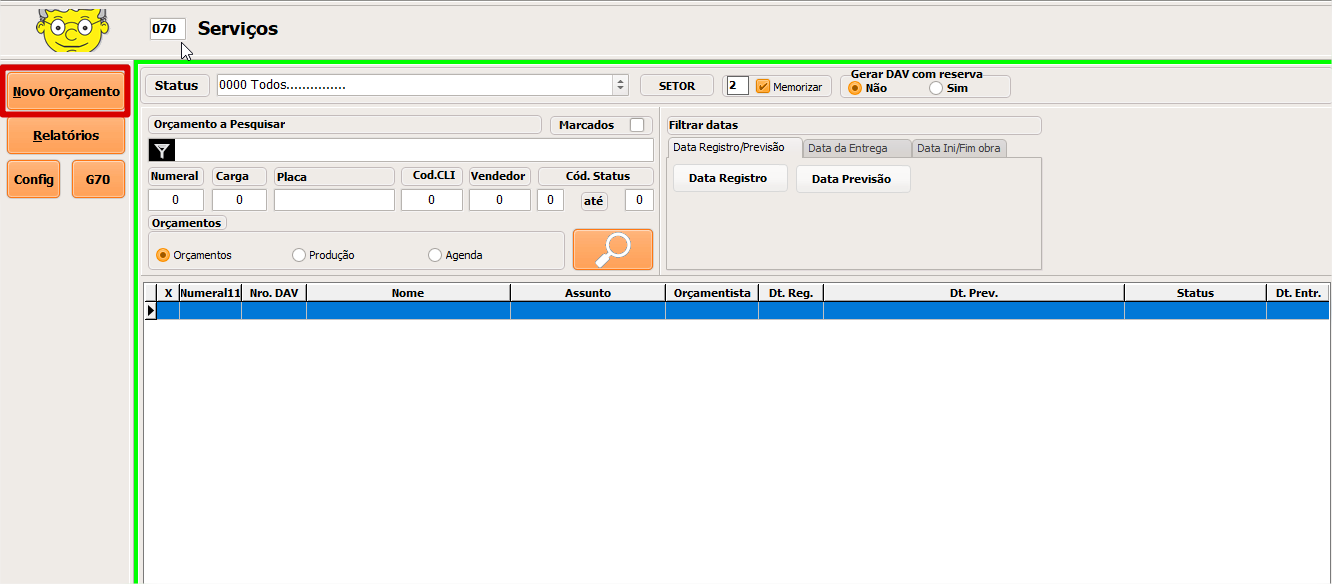
* Clique sobre o botão "Novo Orçamento".

<figure><img src="https://3562139026-files.gitbook.io/~/files/v0/b/gitbook-x-prod.appspot.com/o/spaces%2FbwneEczWTjwdv0AAz10t%2Fuploads%2FxAIrdb4QY5zi0x9bW7vA%2Fimage.png?alt=media&#x26;token=d40c64b9-cb04-4007-8c56-b464b4d2dd7c" alt=""><figcaption></figcaption></figure>

* Selecione o cliente.

<figure><img src="https://3562139026-files.gitbook.io/~/files/v0/b/gitbook-x-prod.appspot.com/o/spaces%2FbwneEczWTjwdv0AAz10t%2Fuploads%2FLBY8GonG5gvDpFkfRurl%2Fimage.png?alt=media&#x26;token=3e883e79-38f3-4fcc-8754-f217d29913d2" alt=""><figcaption></figcaption></figure>

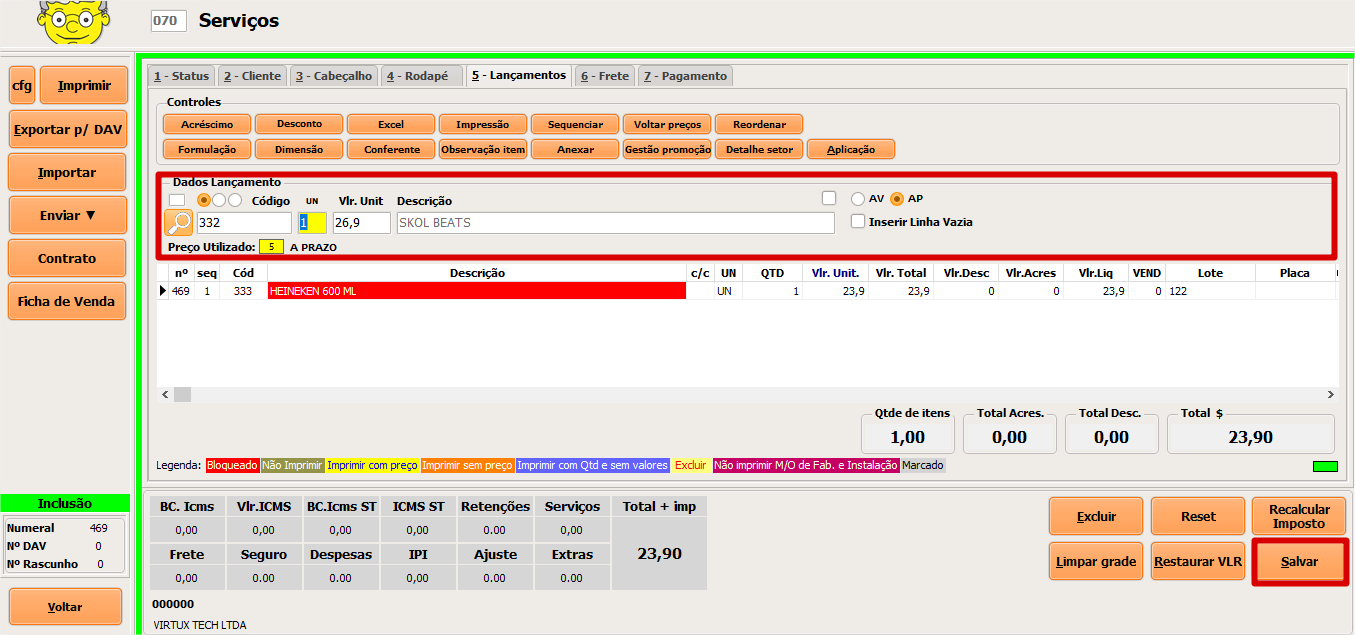
* Insira os produtos desejado e clique em salvar.

<figure><img src="https://3562139026-files.gitbook.io/~/files/v0/b/gitbook-x-prod.appspot.com/o/spaces%2FbwneEczWTjwdv0AAz10t%2Fuploads%2F9qfryjGs3179VsMoAeU2%2Fimage.png?alt=media&#x26;token=4deaf8ac-4a41-4575-ad78-55ff120c02a5" alt=""><figcaption></figcaption></figure>

## Visão Geral:

### Pesquisa:

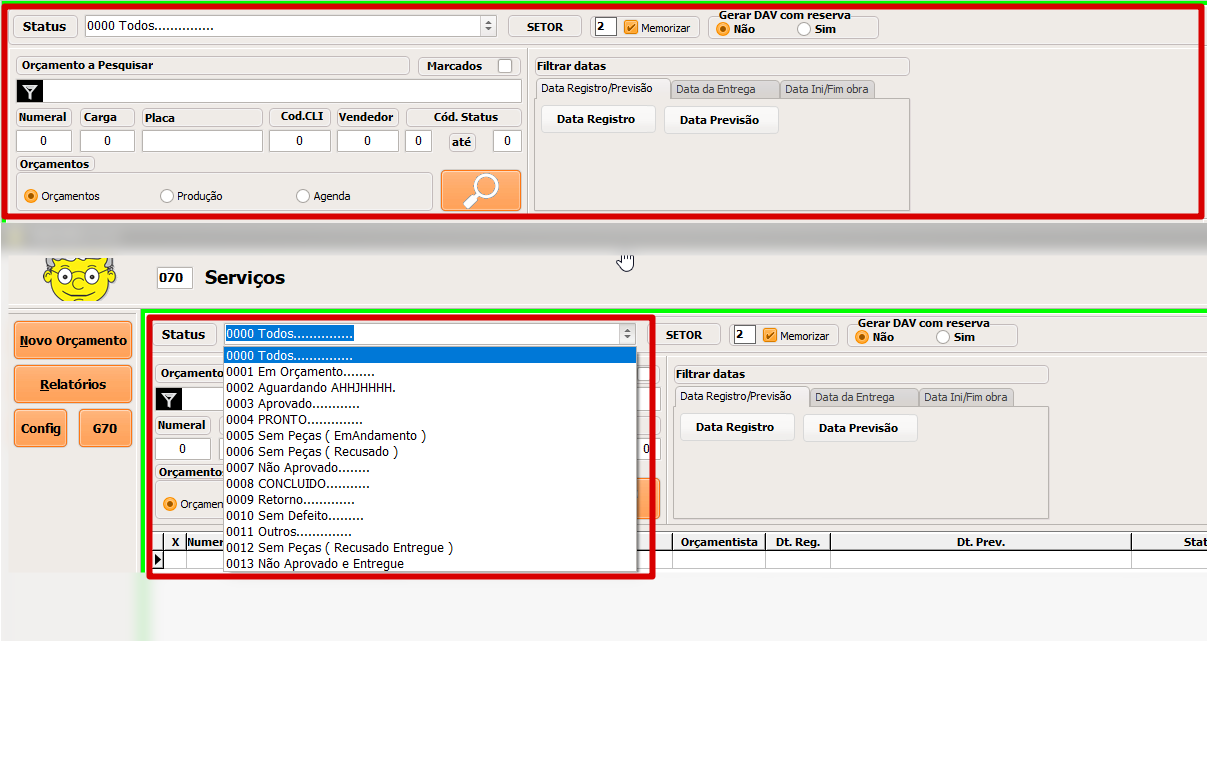
* Pesquisa por status, setor, nome, Nro. DAV, data de registro, data de entrega e data fim da obra.

<figure><img src="https://3562139026-files.gitbook.io/~/files/v0/b/gitbook-x-prod.appspot.com/o/spaces%2FbwneEczWTjwdv0AAz10t%2Fuploads%2F3BdneSig16QsQQ6yR275%2FSem%20t%C3%ADtulo.png?alt=media&#x26;token=3a290f2c-a9d7-48ca-9621-729d16dc5368" alt=""><figcaption></figcaption></figure>

### Criação / edição:

#### 1 - Status:

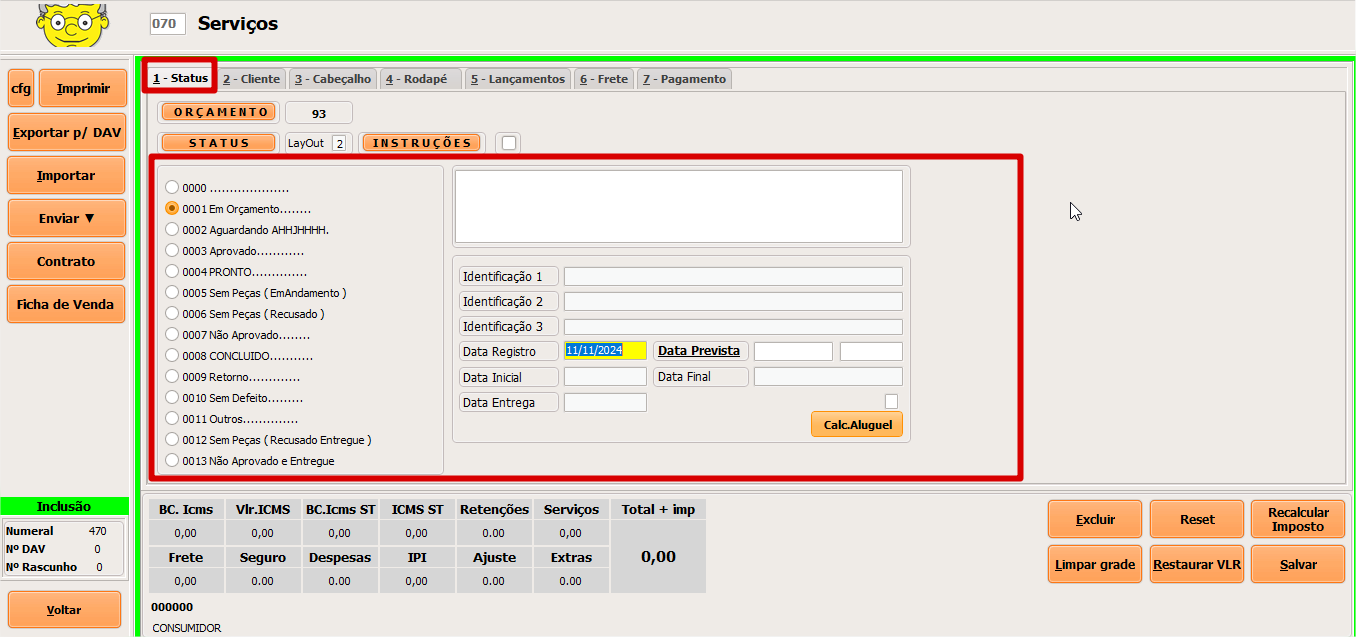
* Aba de definição de status de um oçamento, aqui também definimos data inicial e de entrega.

<figure><img src="https://3562139026-files.gitbook.io/~/files/v0/b/gitbook-x-prod.appspot.com/o/spaces%2FbwneEczWTjwdv0AAz10t%2Fuploads%2FKG5zHkdsISENXuLZIEqS%2Fimage.png?alt=media&#x26;token=1b0feeb3-f433-4902-b5f3-f23f809eefd5" alt=""><figcaption></figcaption></figure>

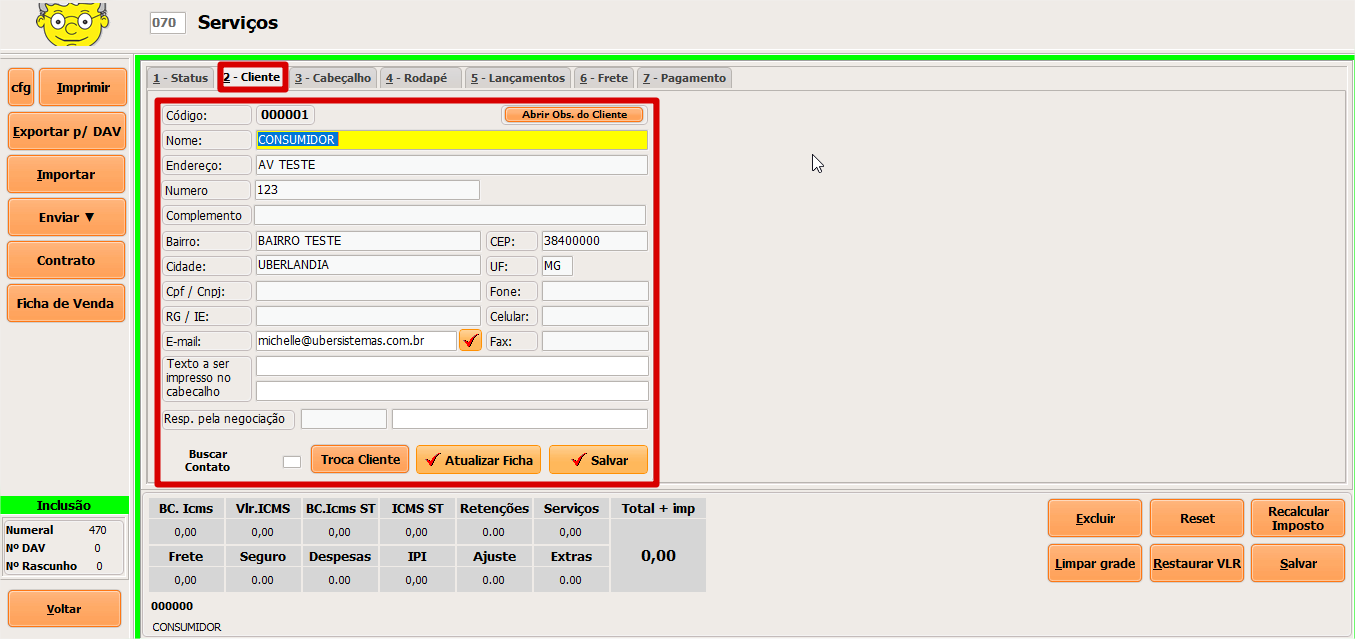
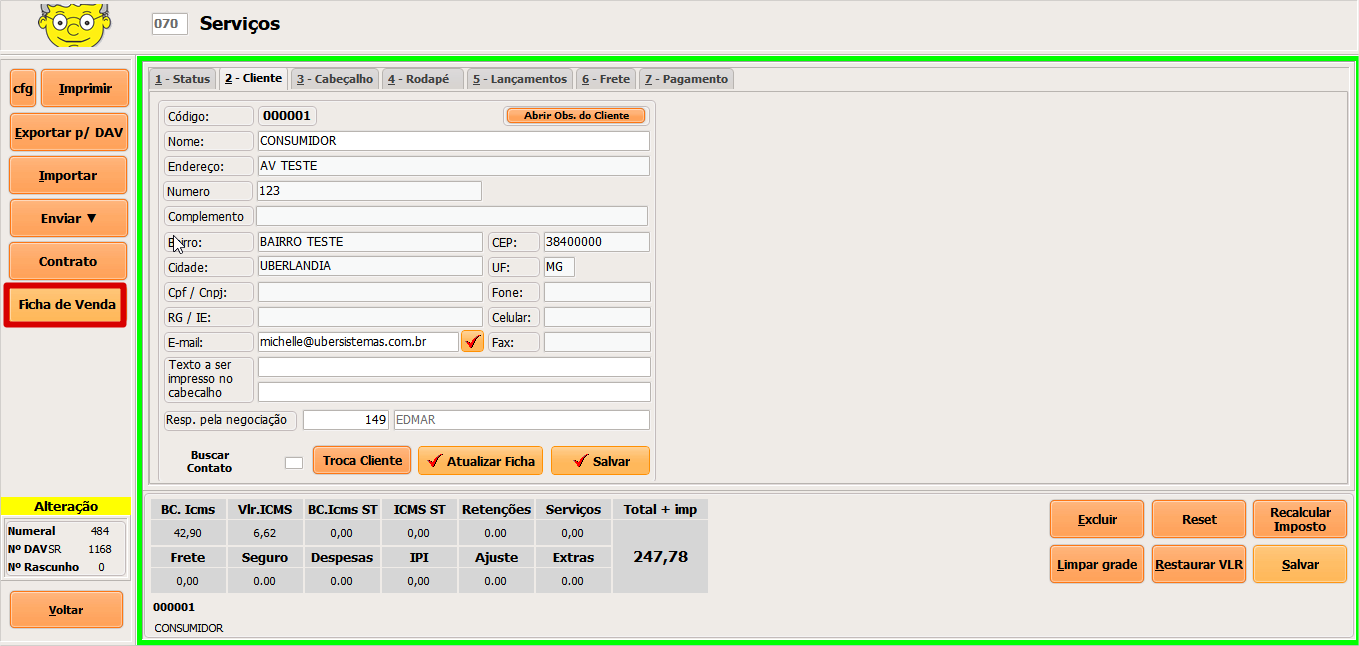
#### 2 - Cliente:

* Possibilidade de trocar o cliente pré selecionado e ou atualizar os dados de cadastro deste cliente.

<figure><img src="https://3562139026-files.gitbook.io/~/files/v0/b/gitbook-x-prod.appspot.com/o/spaces%2FbwneEczWTjwdv0AAz10t%2Fuploads%2FF35OjXHwWoHeQmbBIEk6%2Fimage.png?alt=media&#x26;token=a18a640b-8d8f-44de-86ce-8ec3d7482bfa" alt=""><figcaption></figcaption></figure>

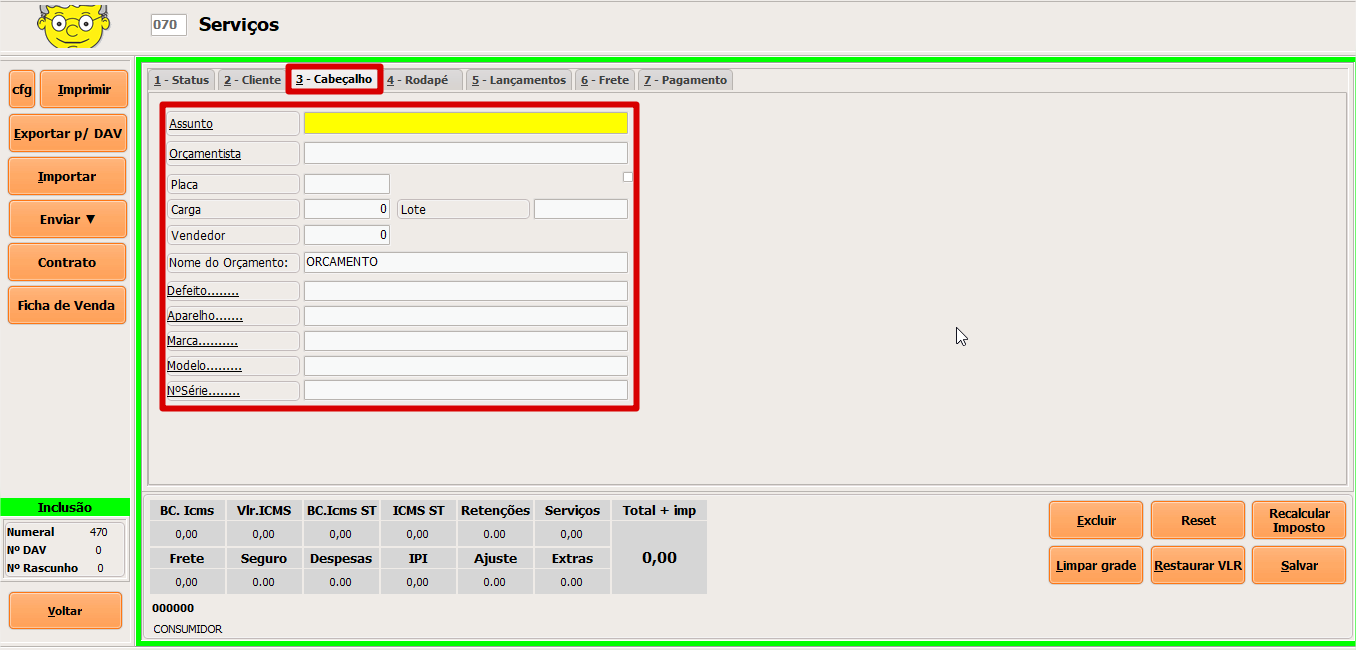
#### 3 - Cabeçalho:

* Informações do cabeçalho do pedido como, assunto, orçamentista, vendedor entre outros campos.

<figure><img src="https://3562139026-files.gitbook.io/~/files/v0/b/gitbook-x-prod.appspot.com/o/spaces%2FbwneEczWTjwdv0AAz10t%2Fuploads%2F8pe7SqLFr9dyWj5WZSh7%2Fimage.png?alt=media&#x26;token=2565cdec-9840-45eb-98b5-9ef45aaf7e4b" alt=""><figcaption></figcaption></figure>

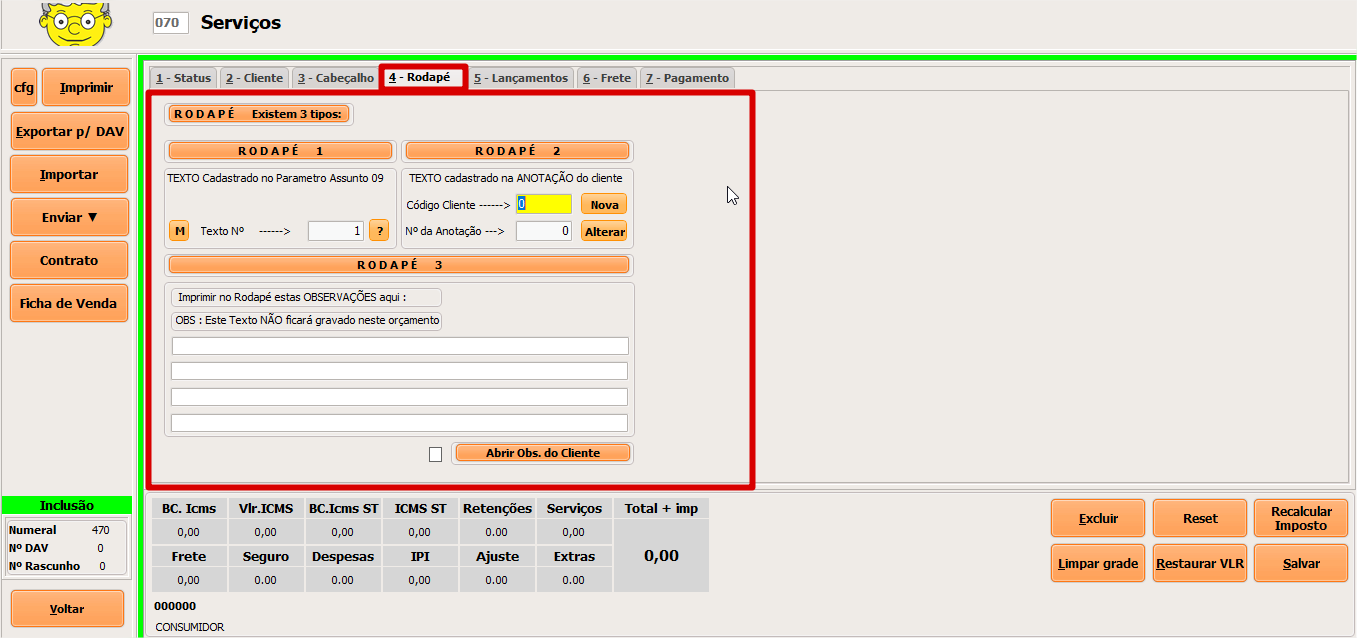
#### 4 - Rodapé:

* Aqui definimos mensagens para o rodapé do pedido.

<figure><img src="https://3562139026-files.gitbook.io/~/files/v0/b/gitbook-x-prod.appspot.com/o/spaces%2FbwneEczWTjwdv0AAz10t%2Fuploads%2Fnl8mF34DdCfAJXsizL9H%2Fimage.png?alt=media&#x26;token=b7c925c8-f876-4f93-909d-cf3bba042b24" alt=""><figcaption></figcaption></figure>

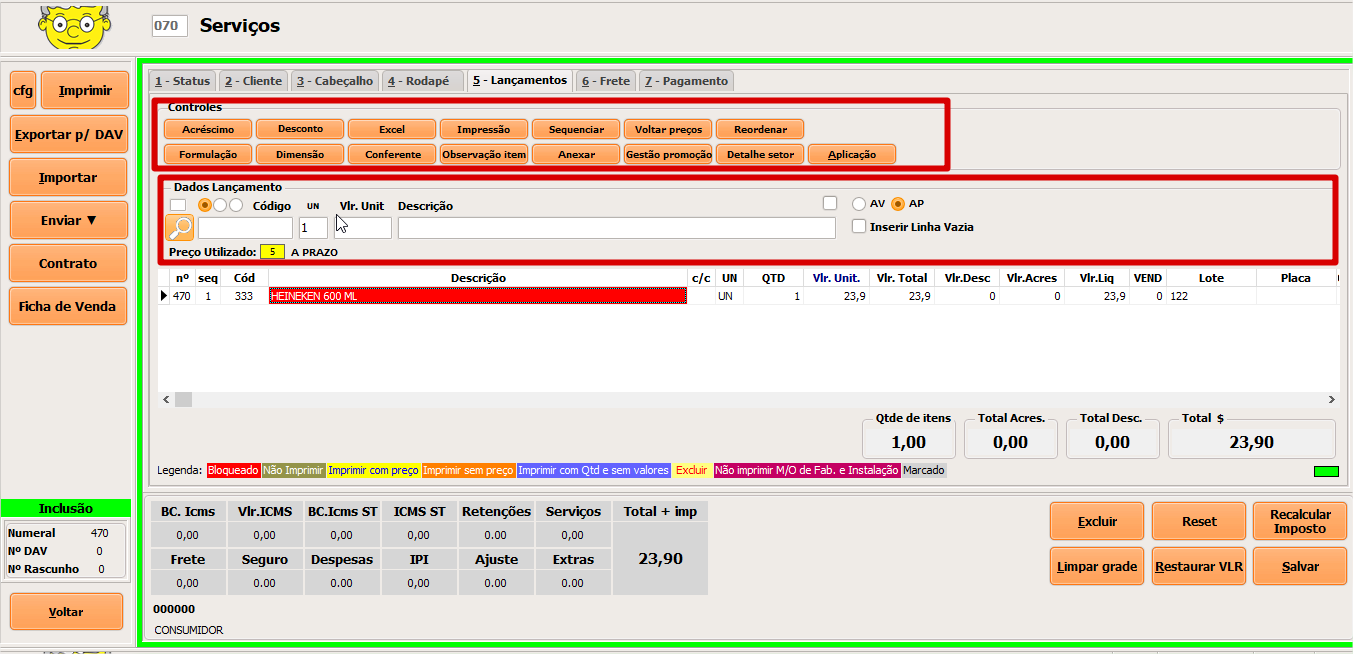
#### 5 - Lançamentos:

* Nesta aba realizamos o lançamento de itens.
* Aqui também podemos aplicar observações nos itens, acréscimos ou descontos entre outras opções.

<figure><img src="https://3562139026-files.gitbook.io/~/files/v0/b/gitbook-x-prod.appspot.com/o/spaces%2FbwneEczWTjwdv0AAz10t%2Fuploads%2FpPvM8jHZbk9UEx1GXStO%2Fimage.png?alt=media&#x26;token=0cee99cb-7dba-46a0-8131-9df2208a4ecd" alt=""><figcaption></figcaption></figure>

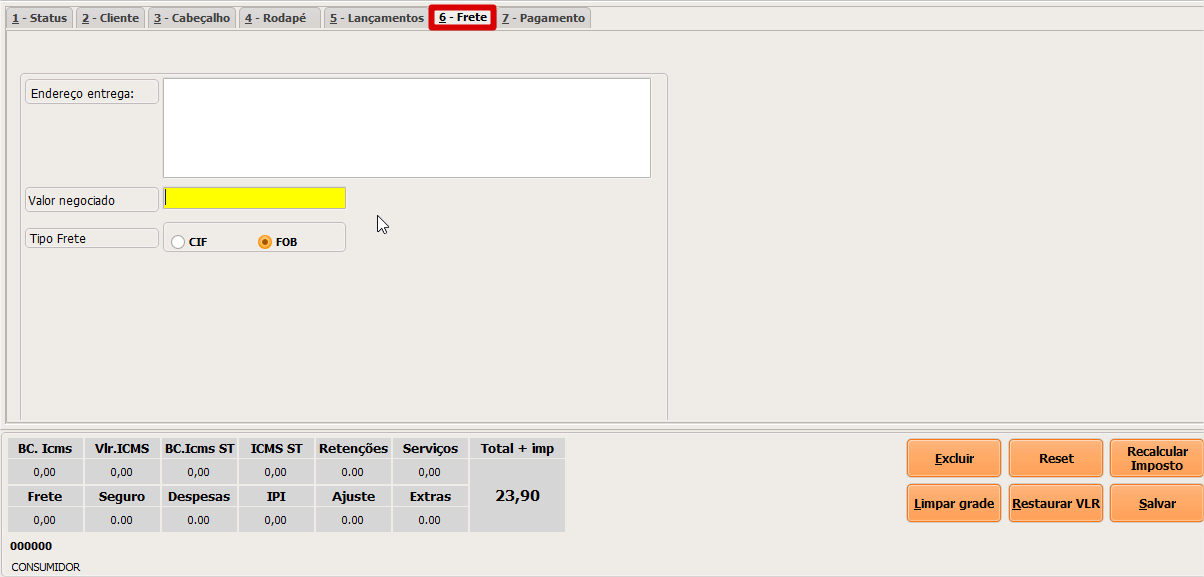
#### 6 - Frete:

* Aqui informamos dados sobre o frete, como endereço de entrega, valor negociado e tipo de frete.

<figure><img src="https://3562139026-files.gitbook.io/~/files/v0/b/gitbook-x-prod.appspot.com/o/spaces%2FbwneEczWTjwdv0AAz10t%2Fuploads%2FdbQDIdPwJbG1f1ZpDWdb%2Fimage.png?alt=media&#x26;token=c917510c-fe29-4ab9-bf7e-f4eeb6c3d42b" alt=""><figcaption></figcaption></figure>

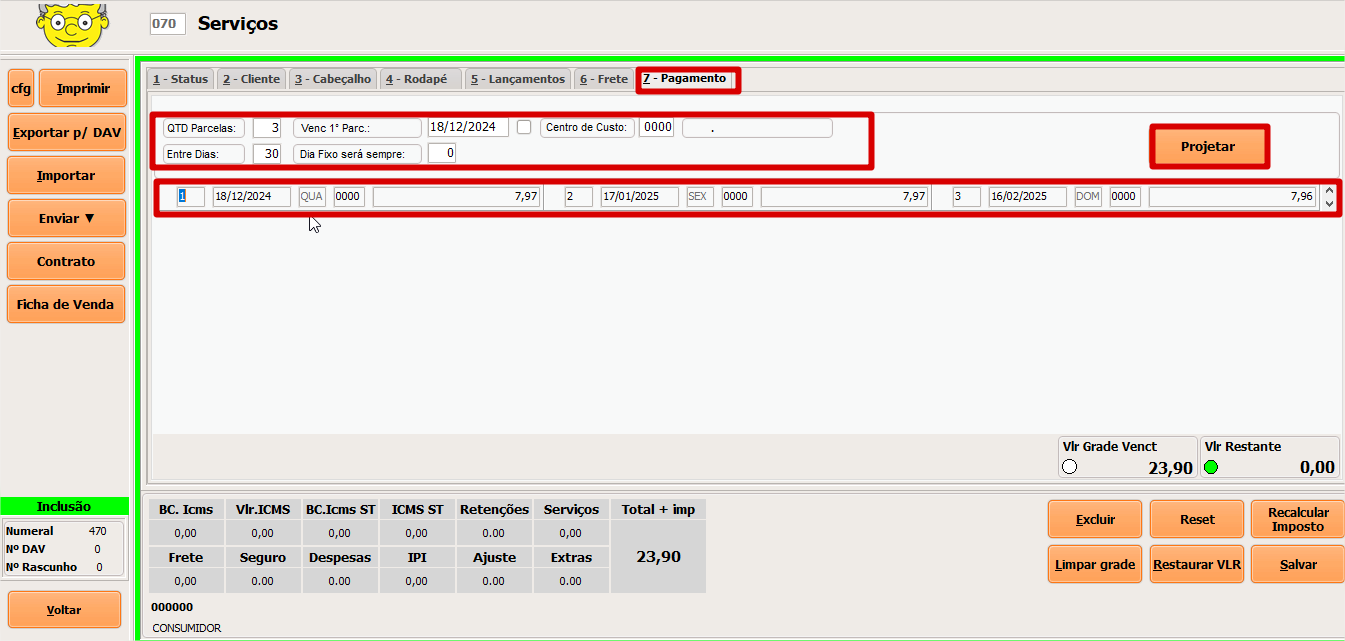
#### 7 - Pagamento:

* Nesta aba definimos a quantidade de parcelas, centro de custo e  projetamos tadas as parcelas de uma só vez.

<figure><img src="https://3562139026-files.gitbook.io/~/files/v0/b/gitbook-x-prod.appspot.com/o/spaces%2FbwneEczWTjwdv0AAz10t%2Fuploads%2FYxZf8p2ztjLDYpFSPWna%2Fimage.png?alt=media&#x26;token=7128cd62-22fd-4043-8c19-43657aa64304" alt=""><figcaption></figcaption></figure>

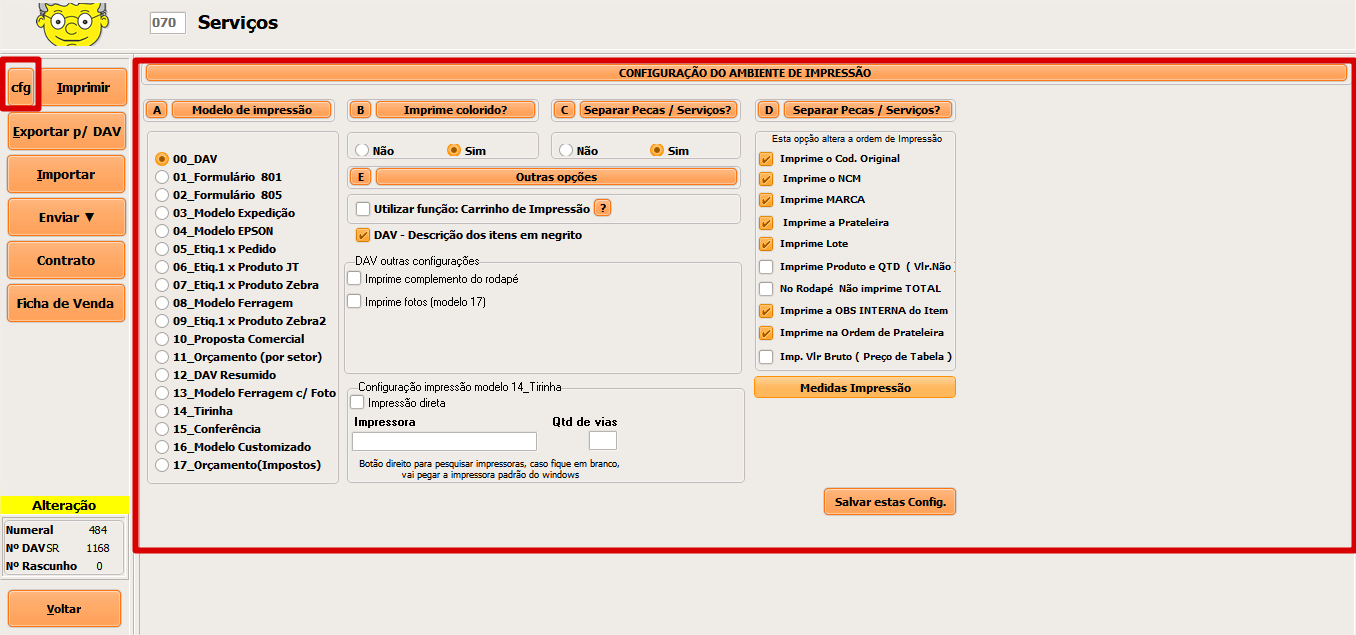
#### CFG:

* Este permite selecionar o modelo de impressão e aplicar algumas configurações nele.

<figure><img src="https://3562139026-files.gitbook.io/~/files/v0/b/gitbook-x-prod.appspot.com/o/spaces%2FbwneEczWTjwdv0AAz10t%2Fuploads%2Fu0Km9RNI4kwK8Qbv7Tsn%2Fimage.png?alt=media&#x26;token=4e2366c2-b12a-498e-a063-bf35f74a25d5" alt=""><figcaption></figcaption></figure>

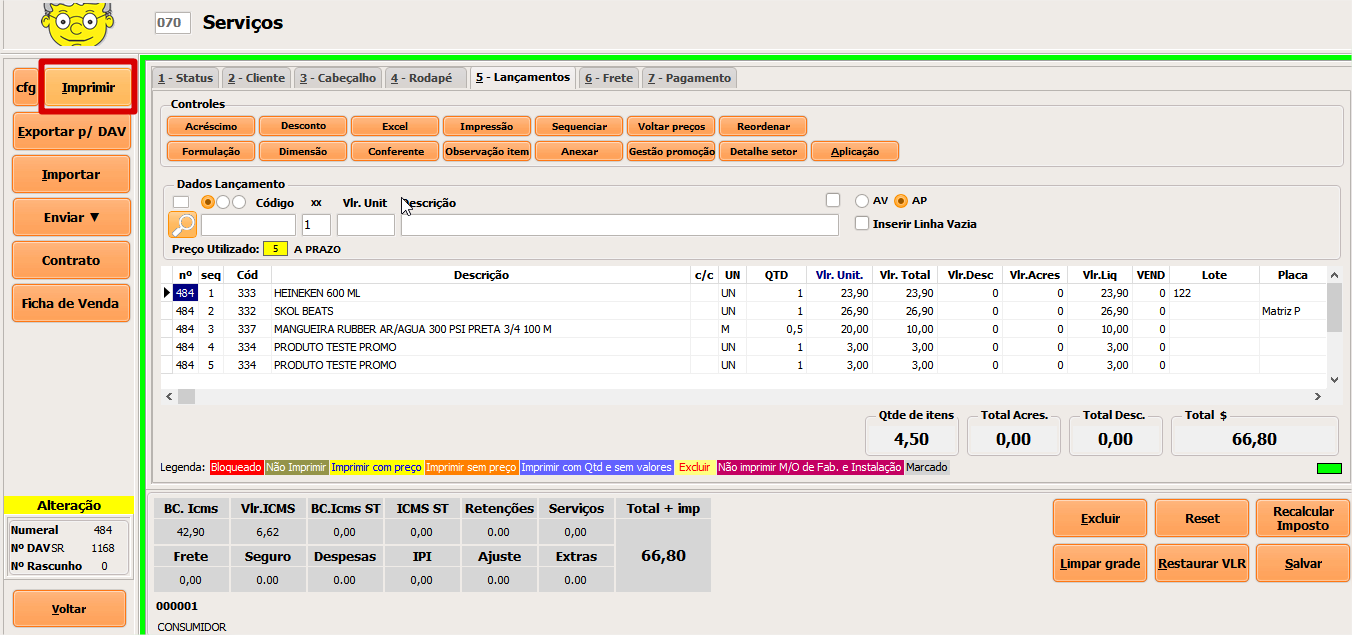
#### Impressão:

* Realiza impressão do pedido em um dos 18 modelos de impressão conforme configuração aplicada.

<figure><img src="https://3562139026-files.gitbook.io/~/files/v0/b/gitbook-x-prod.appspot.com/o/spaces%2FbwneEczWTjwdv0AAz10t%2Fuploads%2FS5aUTLQrTuY7Yl4cVXVQ%2Fimage.png?alt=media&#x26;token=14d6a17b-d0cf-4a80-92aa-59b9f5de8bd7" alt=""><figcaption></figcaption></figure>

#### Exportar p/DAV:

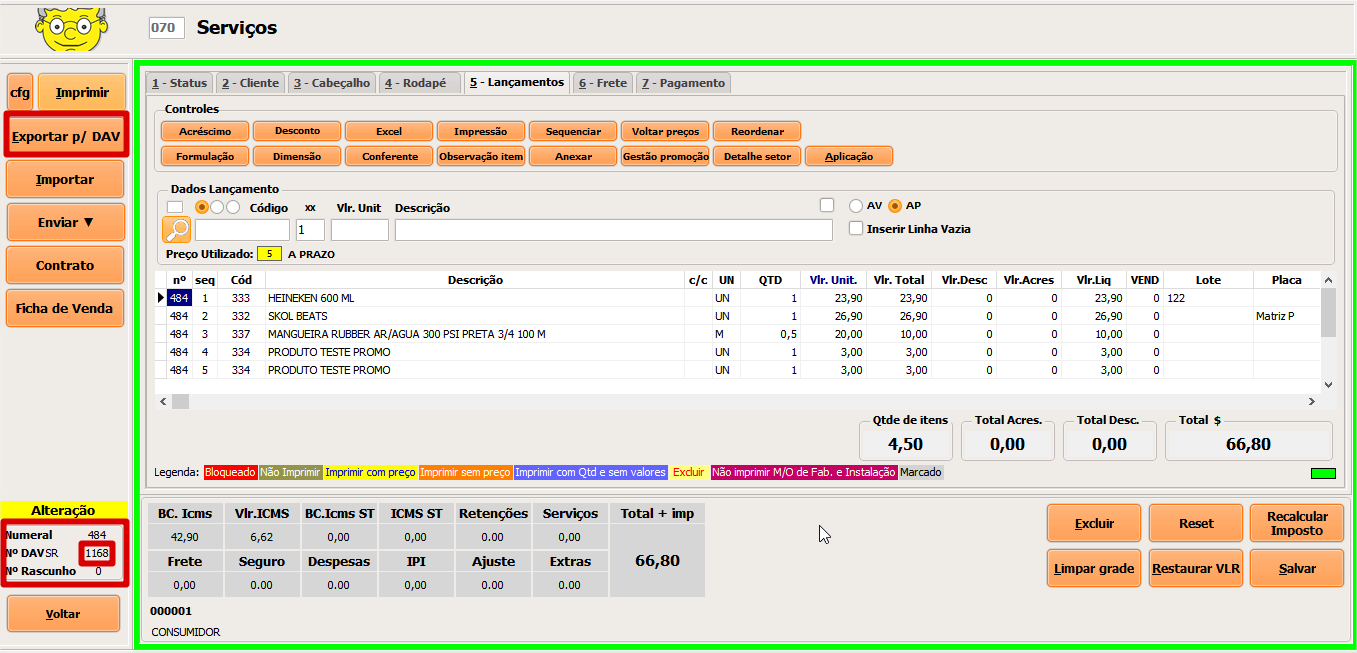
* Gera uma DAV a partir de um orçamento.

<figure><img src="https://3562139026-files.gitbook.io/~/files/v0/b/gitbook-x-prod.appspot.com/o/spaces%2FbwneEczWTjwdv0AAz10t%2Fuploads%2F0UKSjvbpT7hyXdE2i2P2%2Fimage.png?alt=media&#x26;token=b6d01142-6c95-4872-a191-aed18e0bbf49" alt=""><figcaption></figcaption></figure>

#### Importar:

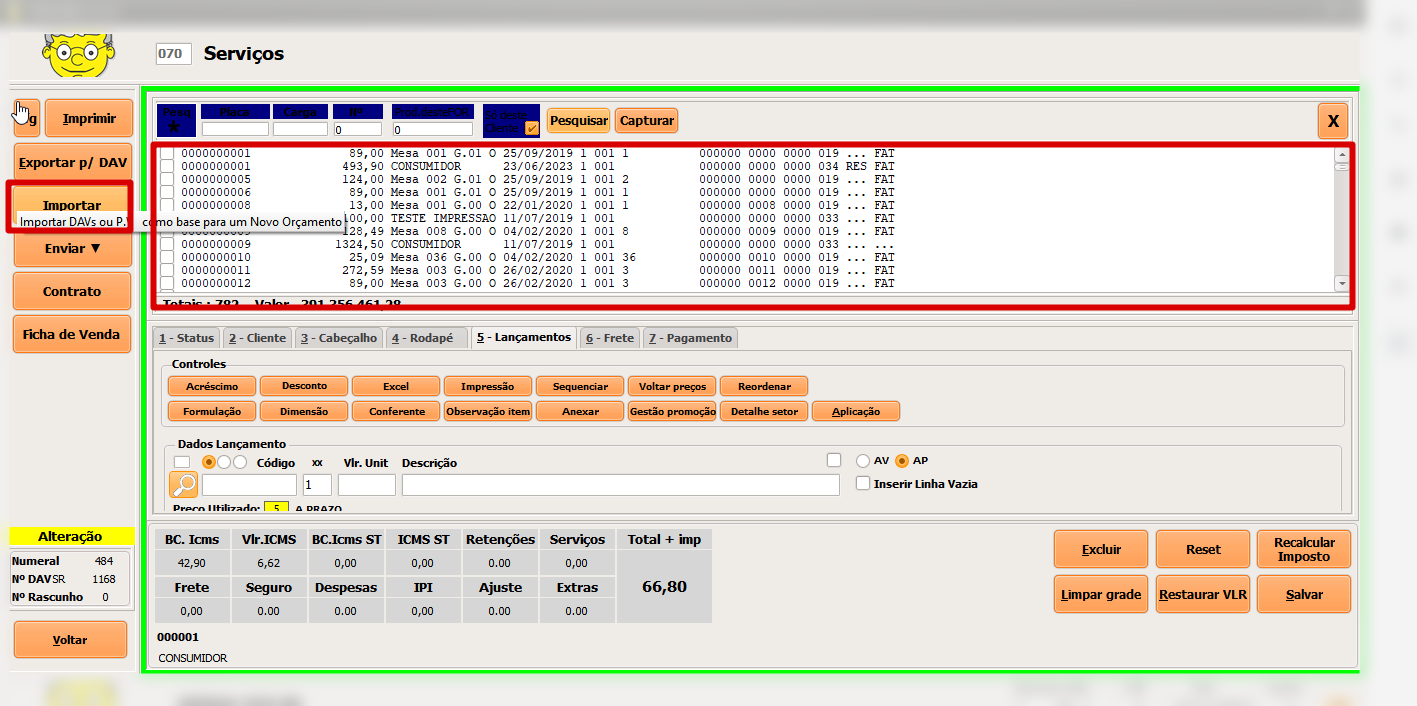
* Permite importar produtos de um outro orçamento para o orçamento atual.

<figure><img src="https://3562139026-files.gitbook.io/~/files/v0/b/gitbook-x-prod.appspot.com/o/spaces%2FbwneEczWTjwdv0AAz10t%2Fuploads%2Fg9TIlAwZV8iSKaBVuy8P%2Fimage.png?alt=media&#x26;token=d1500975-a14f-44c0-bb84-413fcabf32c1" alt=""><figcaption></figcaption></figure>

#### Enviar:

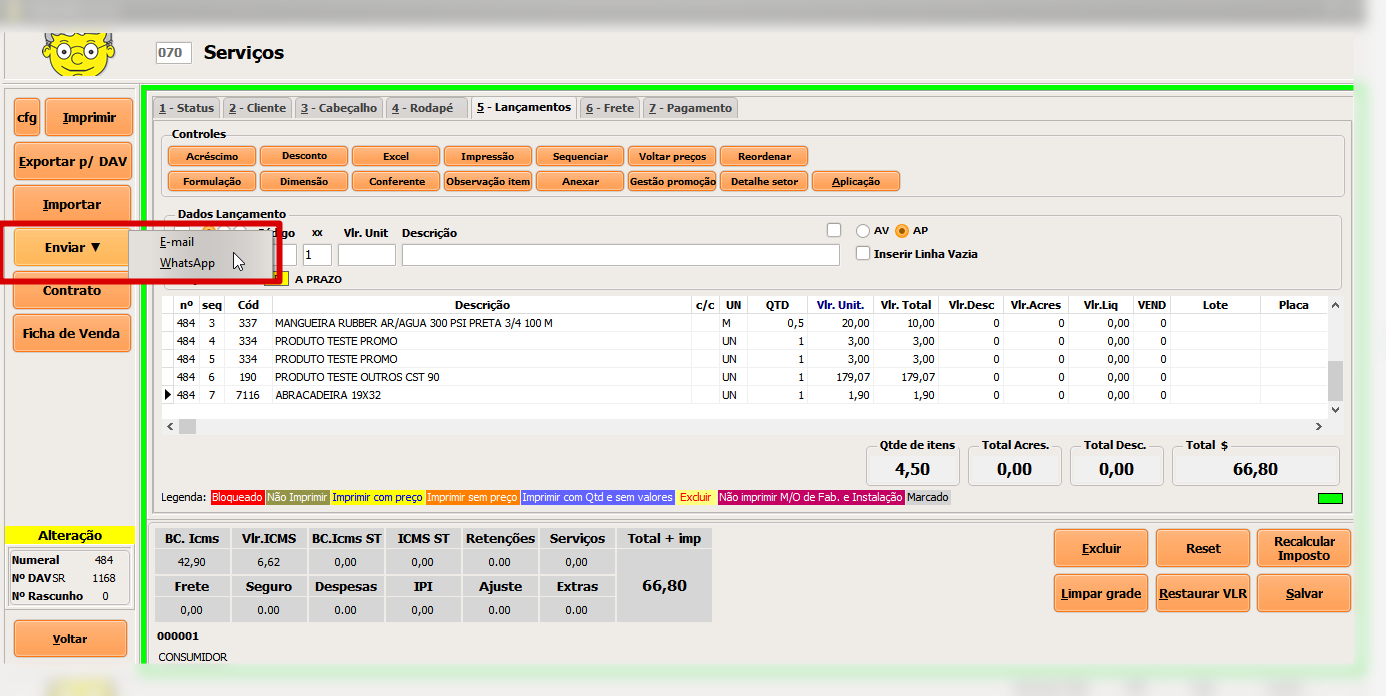
* Permite o envio do orçamento via e-mail ou whatsapp.

<figure><img src="https://3562139026-files.gitbook.io/~/files/v0/b/gitbook-x-prod.appspot.com/o/spaces%2FbwneEczWTjwdv0AAz10t%2Fuploads%2FubqmEN05ZVmCplhRBj1H%2Fimage.png?alt=media&#x26;token=6d1a9edd-a8f8-443a-bf75-38de6d8fa50b" alt=""><figcaption></figcaption></figure>

#### Contrato:

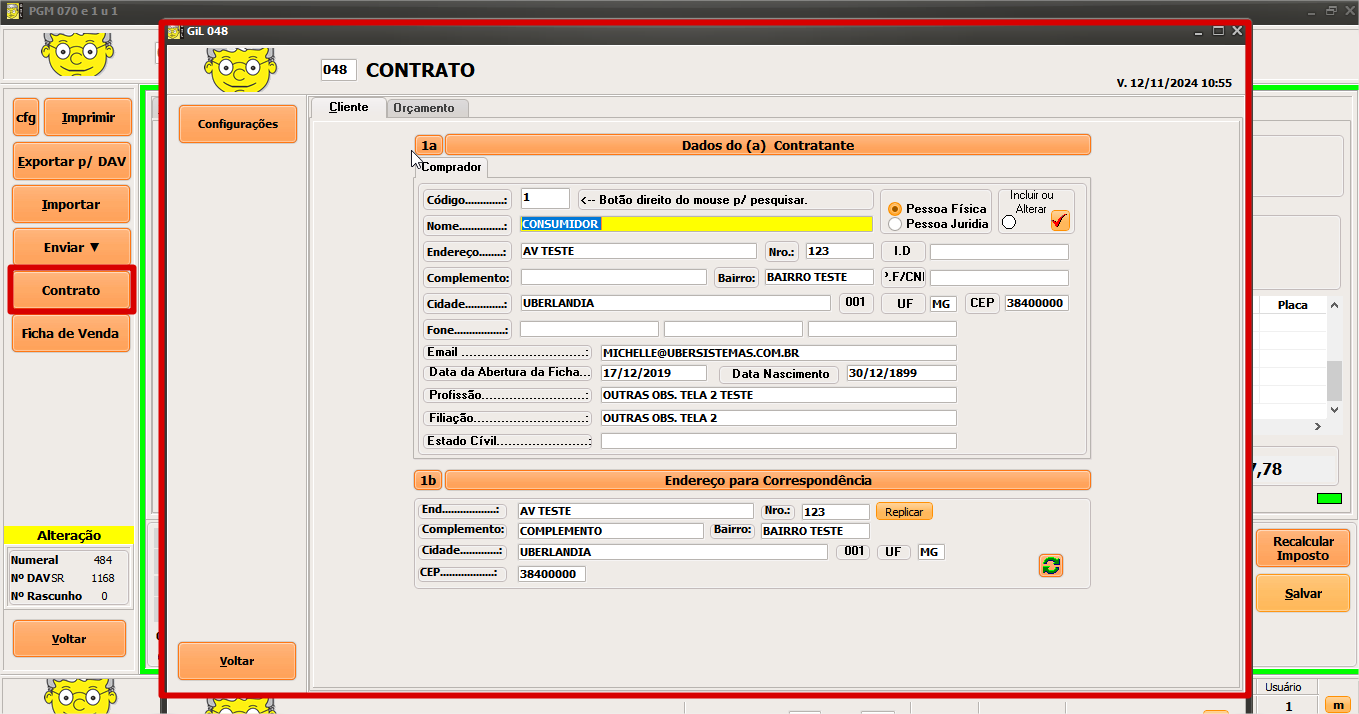
* Atalho para o PGM 048, gerando assim um contrato com os dados deste orçamento.

<figure><img src="https://3562139026-files.gitbook.io/~/files/v0/b/gitbook-x-prod.appspot.com/o/spaces%2FbwneEczWTjwdv0AAz10t%2Fuploads%2FPXlGsV3DQXLwLC4BaYUd%2Fimage.png?alt=media&#x26;token=5d5d804a-5e43-467b-a8a6-eb596e5b614e" alt=""><figcaption></figcaption></figure>

#### Ficha de venda:

* Gera uma impressão com os dados da ficha cliente e da ficha responsável pela negociação.

<figure><img src="https://3562139026-files.gitbook.io/~/files/v0/b/gitbook-x-prod.appspot.com/o/spaces%2FbwneEczWTjwdv0AAz10t%2Fuploads%2FY5eVe82ZfSYe28SW1fKe%2Fimage.png?alt=media&#x26;token=2e7e0a09-09e0-4293-8b04-316d3ac088cf" alt=""><figcaption></figcaption></figure>


---

# Agent Instructions: Querying This Documentation

If you need additional information that is not directly available in this page, you can query the documentation dynamically by asking a question.

Perform an HTTP GET request on the current page URL with the `ask` query parameter:

```
GET https://manual-gil.gitbook.io/manual-sistema-gil/pgm-070-servicos.md?ask=<question>
```

The question should be specific, self-contained, and written in natural language.
The response will contain a direct answer to the question and relevant excerpts and sources from the documentation.

Use this mechanism when the answer is not explicitly present in the current page, you need clarification or additional context, or you want to retrieve related documentation sections.